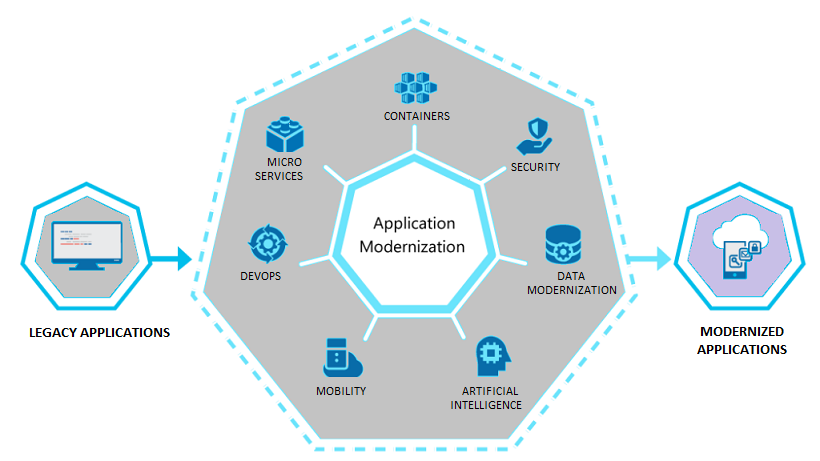
A Windows Forms or VB6 application that's run the business for fifteen years usually still works — until the one developer who understands it leaves, or it needs a feature the desktop platform can't support. We modernize it without losing the logic that took years to get right.
The business rules in an old desktop app are usually the most valuable part of it. We extract and preserve that logic instead of throwing it out and starting over from a blank requirements doc.
Whether you're moving off Windows Forms, WPF, or VB6, we plan a path to a web application your team can access from anywhere — not just the machine it happens to be installed on.
How We Modernize a Desktop Application
1. Business Logic Extraction: We document and extract the rules embedded in the existing application — validation logic, calculations, workflow rules — so nothing gets lost in translation to the new platform.
2. Data Migration Without Disruption: Local databases and file-based storage move to a proper backend — SQL Server, Azure SQL, or another target — with validation so the migrated data matches the source exactly.
3. A Web UI Built Around How People Actually Use It: We rebuild the interface in ASP.NET Core or Blazor around real usage patterns, not a literal screen-by-screen copy of a UI designed for a mouse and a fixed-resolution monitor twenty years ago.
4. A Phased Cutover Instead of a Big-Bang Rewrite: Where possible, we migrate module by module so the team keeps working in the old system while the new one comes online, instead of a high-risk single cutover date.
5. Deployment That Doesn't Depend on a Specific Machine: The result is a web application your team reaches from any browser, removing the "it only works on that one PC" constraint that desktop software eventually runs into.
Why Choose Akantik for Desktop Modernization?
Rewriting a desktop application from scratch usually means re-litigating business rules nobody wrote down the first time. We reverse-engineer what the application actually does before we touch the rebuild.
We've Worked in the Old Stack Too: Understanding Windows Forms, WPF, and VB6 well enough to read them accurately is what keeps business logic from getting lost in the rewrite.
Modernization Without a Full Stop: We plan migrations that let the business keep running on the old system while the new one is built and validated, not a forced cutover before it's ready.
A Platform Built to Outlast This Migration Too: The web application we hand over is built on maintainable, supported technology, so it doesn't become the next legacy system in another fifteen years.
Still running a business-critical process on a desktop app from another decade? Let's talk about modernizing it.
Common questions about modernizing legacy Windows Forms, WPF, and VB6 applications.
Yes, VB6 modernization is one of the more common projects we take on. We reverse-engineer the business logic from the existing codebase and rebuild it on ASP.NET Core, since the original language and runtime are long past end of support.
No — the goal is functional parity or better. Anything the desktop app does today gets mapped and rebuilt in the web version.
Some desktop-only features (deep OS integration, certain hardware access) may need an alternative approach, which we flag during the assessment.
We read and document the existing code's validation rules, calculations, and workflow logic before writing a line of new code, then verify the rebuilt version against the same test cases and edge cases the original handles.
In most cases, yes. We migrate module by module where the application's structure allows it, so your team keeps working in the existing system while each piece of the new one comes online and gets validated.
Typically ASP.NET Core or Blazor for the application layer, with SQL Server or Azure SQL for the data layer. The specific target depends on your existing infrastructure, team skills, and hosting preferences.