Microsoft Copilot Integration

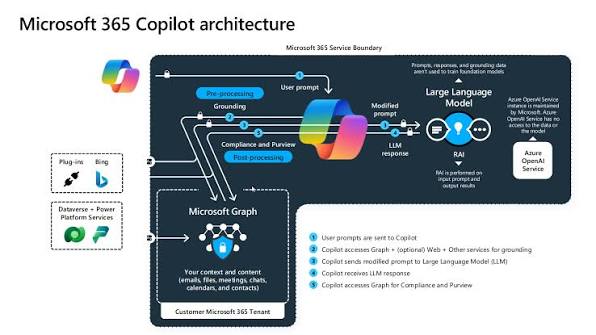
Microsoft 365 Copilot out of the box is generic — it doesn't know your internal processes, your line-of-business systems, or the data sitting in your SharePoint sites and Dataverse tables until you connect it.

We extend Copilot with custom plugins and connectors so it can answer from your actual systems, and build purpose-specific copilots in Copilot Studio for the workflows Microsoft's default experience doesn't cover.

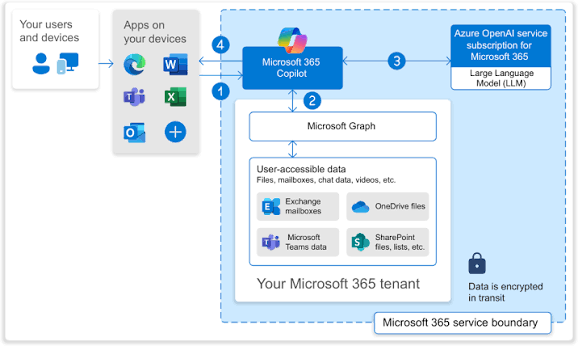
Every extension we build respects your existing data boundaries — Copilot doesn't get access to anything a user couldn't already reach through normal permissions.

What We Set Up in Your Copilot Environment

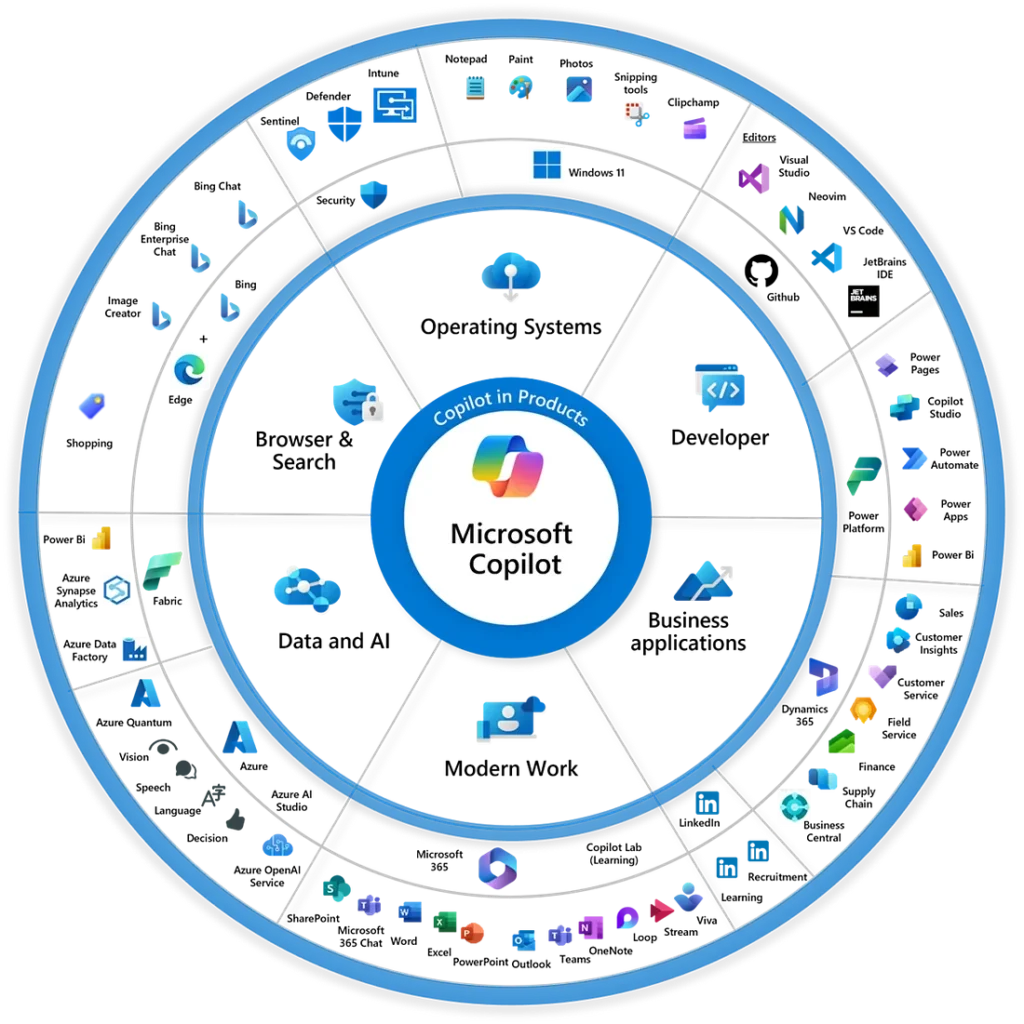
1. Custom Plugins and Connectors: We build connectors that let Copilot query your line-of-business systems — CRM, ERP, ticketing — directly from a Microsoft 365 conversation, instead of a user switching apps to find the answer.
Microsoft Copilot Integration

2. Org-Specific Copilots in Copilot Studio: For workflows Microsoft's default Copilot doesn't cover, we build purpose-built copilots in Copilot Studio — scoped to a specific team or process, not a general-purpose assistant.

3. Grounded in SharePoint and Dataverse: Copilot answers from your actual internal documents and business data — not just public web results — so responses reflect your organization's real information.

4. Data Boundaries Enforced, Not Assumed: Copilot only surfaces what a user's existing Microsoft 365 permissions already allow — we configure and test this explicitly rather than trusting the default behavior.

5. Governance and Usage Oversight: Admin controls, usage policies, and audit visibility are set up from rollout, so IT has visibility into what Copilot is being asked and accessing.

Why Choose Akantik for Copilot Integration?

Turning on Copilot licenses without connecting it to your actual systems gets you a slightly better autocomplete. The value is in the integration work most rollouts skip.

Microsoft Stack Experience: We already work across SharePoint, Dataverse, Power Platform, and Azure AD, so connecting Copilot to your environment doesn't start from zero.

Security-First Configuration: We test data boundaries explicitly before rollout, so Copilot doesn't become the fastest way to accidentally surface something sensitive.

Adoption-Focused Rollout: We help identify the specific workflows where Copilot actually saves time, so the rollout lands as a real productivity gain instead of an underused license.

Rolled out Copilot licenses but not seeing the value yet? Let's connect it to the systems that matter.

Microsoft Copilot Integration

Microsoft Copilot Integration - Frequently Asked Questions

Common questions about extending and customizing Microsoft 365 Copilot.

What does Copilot integration actually involve?

Copilot integration means connecting Microsoft 365 Copilot to your internal systems and data:

  • Custom plugins and connectors to line-of-business systems
  • Copilot Studio agents for org-specific workflows
  • Grounding in SharePoint and Dataverse data
What is Copilot Studio and when do I need it?

Copilot Studio is Microsoft's low-code platform for building custom copilots scoped to specific teams or workflows.

You need it when the default Microsoft 365 Copilot doesn't cover a specific process your organization runs.

Can Copilot connect to our line-of-business applications?

Yes, Akantik builds custom connectors and plugins that let Copilot query systems like your CRM, ERP, or ticketing platform directly from a Microsoft 365 conversation, without a user having to switch applications.

How does Copilot integration handle data security?

Copilot respects existing Microsoft 365 permissions — it only surfaces content a user could already access.

Akantik explicitly tests these boundaries before rollout rather than assuming default behavior is correct.

We already have Copilot licenses — why aren't we seeing value from them?

Most organizations turn on Copilot without connecting it to internal data, so it behaves like a generic assistant.

Real value comes from:

  • Grounding it in your actual documents (SharePoint, Dataverse)
  • Building connectors to line-of-business systems
  • Identifying the specific workflows where it saves real time
Hire Us